
![[AndyB] Most posts](/data/resource_icons/11/11848.jpg?1720149296)
- XF Compatibility
- 2.2.x
- Short Description
- Alibaba Cloud's Most Posts widget displays top posts with options for user group exclusions. Easily add via Admin Control Panel, set display positions, and enable automatic hourly updates through Cron entries.
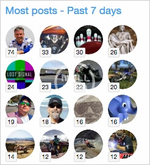
Displays a Most posts widget.
(Example of Most posts widget)
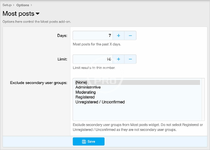
(Example of Options page)
(Example of User group permissions)

Features:
Normally you will select Yes to the following User groups:
Registered
Unregistered / Unconfirmed
Cron entries:
This add-on updates the widget every hour. When you first install the add-on please run the Cron entries manually in order to see the widget:
Admin control panel -> Tools -> Cron entries -> Most posts
Questions and Answers:
Q: When do the post count numbers update?
A: They are updated once per hour by Cron entry.
(Example of Most posts widget)
(Example of Options page)
(Example of User group permissions)
Features:
- Option to exclude secondary user groups.
- All phrases start with mostposts_ for your convenience.
- Admin Control Panel -> Appearance -> Widgets
- Widget definition = Most posts
- Widget key = most_posts
- Title = (leave blank)
- Display in positions = Forum list: Sidebar
- Click Save.
Normally you will select Yes to the following User groups:
Registered
Unregistered / Unconfirmed
Cron entries:
This add-on updates the widget every hour. When you first install the add-on please run the Cron entries manually in order to see the widget:
Admin control panel -> Tools -> Cron entries -> Most posts
Questions and Answers:
Q: When do the post count numbers update?
A: They are updated once per hour by Cron entry.


![[AndyB] Delete profile posts all](/data/resource_icons/9/9947.jpg?1725664232)
![[AndyB] Delete posts banned](/data/resource_icons/9/9999.jpg?1720149285)
![[AndyB] Delete posts cli](/data/resource_icons/23/23077.jpg?1734064930)