
![[AndyB] Resolved](/data/resource_icons/12/12985.jpg?1720149301)
- XF Compatibility
- 2.2.x
- Short Description
- Easily change forum thread prefixes with our tool. Create a "Resolved" thread prefix and update options page for seamless management. Setup in Admin control panel, follow URL instructions to get IDs.
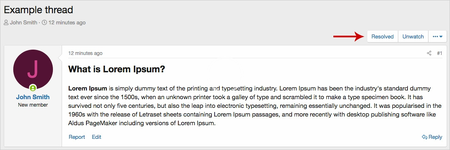
Allows thread starter or staff to easily change thread prefix.
(Example of Resolved button)
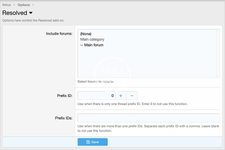
(Example of Options page)
(Example of User group permissions)

Features:
(Example of Resolved button)
(Example of Options page)
(Example of User group permissions)
Features:
- All phrases start with resolved_ for your convenience.
- Go to Admin control panel -> Forums -> Thread prefixes and create a thread prefix called Resolved. You can also create additional thread prefixes if needed.
- Get the thread prefix ID number(s), you can see this number by looking at the URL while hovering your cursor over the thread prefix name.
- Update the Options page of the Resolved add-on with your thread prefix ID number(s).


![[AndyB] Advertising responsive](/data/resource_icons/7/7380.jpg?1720149273)
![[AndyB] Cube](/data/resource_icons/11/11639.jpg?1720149296)
![[AndyB] Delete all tags](/data/resource_icons/11/11798.jpg?1720149296)