

- Short Description
- Hecxa is a modern, clean WordPress template kit ideal for Creative Design Agencies, Digital Agencies, Portfolio Websites, and Freelancers. With 16+ templates, fully responsive design, and easy customization via Elementor, Hecxa offers a professional look without coding. Import your kit with Envato Elements plugin for seamless setup.
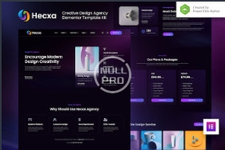
Hecxa is a modern and clean Elementor Template Kit that is perfect for those who want to create a WordPress-based website for Creative Design Agency, Digital Agency, Website Development, Design Studio, Portfolio, Designer, Freelancer, and any related business. This template has a professional design with a 100% responsive layout, is retina-ready, and is very easy to customize because using Elementor so you don’t need a single line of coding!
This template kit includes stunning carefully crafted 16+ stunning templates, you can build your professional-looking company business website just in a click away.
Features:
- Using Free Plugins (Elementor Pro is not required)
- Modern & Clean Design
- 16+ Ready to use templates
- Fully Responsive Layout
- Retina Ready
- Fully Customizable
- Cross Browser Compatibility: Chrome, Firefox, Safari, Opera
- Home
- Project
- Project Details
- Blog
- News & Update
- Post Details
- About
- Pricing
- FAQ
- 404
- Contact
- Header
- Footer
- Offcanvas
- Metform Contact
- Global Theme Style
- Elementor
- Jeg Elementor Kit
- MetForm
- Elementor Pro
- You may optionally install WooCommerce with the NFT Maker plugin to create a fully functional NFT marketplace with Elementor Pro.
- Install and Activate the "Envato Elements" plugin from Plugins > Add New in WordPress
- Download your kit file and Do not unzip
- Go to Elements > Installed Kits and click the Upload Template Kit button. You may also import automatically by clicking Connect Account to link your Elements subscription, then import under Elements > Template Kits.
- Check for the orange banner at the top and click Install Requirements to load any plugins the kit uses
- Click import on the Global Kit Styles first
- Click Import on one template at a time. These are stored in Elementor under Templates > Saved Templates.
- Go to Pages and create a new page and click Edit with Elementor
- Click the gear icon at lower-left of the builder to view page settings and choose Elementor Full Width and hide page title
- Click the gray folder icon to access My Templates tab and then Import the page you'd like to customize.


