

- XF Compatibility
- 2.2.x
- Short Description
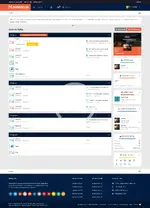
- Magnesium Style Brivium - Simplified XenForo theme easily installed with just three steps. Upload files, access Admin Control Panel, import style.xml for seamless integration.
Magnesium - Style Brivium is a simple theme for xf script

INSTALLATION INSTRUCTIONS
1. Upload the contents of the upload directory to the root of your XenForo installation.
2. Go into your XenForo Admin Control Panel, click on Appearance menu, select Styles menu, and then click on "Import a Style" in the left-hand navigation list.
3. Click on the upload file field, and then navigate to and select the style.xml file.
INSTALLATION INSTRUCTIONS
1. Upload the contents of the upload directory to the root of your XenForo installation.
2. Go into your XenForo Admin Control Panel, click on Appearance menu, select Styles menu, and then click on "Import a Style" in the left-hand navigation list.
3. Click on the upload file field, and then navigate to and select the style.xml file.


