

- XF Compatibility
- 2.2.x
- Short Description
- Control your forum's Multi-Quote, Reply, and @Mention links easily. This add-on offers clear reply options and reduces unnecessary quotes, perfect for all forums. Style buttons with unique texts like "Reply," "," or "Mention Username." Customize language items for easy translation.
Complete control over your Multi-Quote, Quote, Reply and new @Mention post reply links.
If you’d like to offer users the ability to reply to posts without forcing them to quote, this is the add-on you’re looking for. This add-on aims to make reply options more clear to users, while also reducing the amount of unnecessary quotes within threads.
This is a useful tool for all forums. Give posters options to reply with an @mention instead of forcing them to quote posts. Or, remove/alter the reply buttons to your specific forum users and forum taste.
Features:

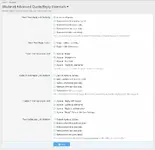
If you’d like to offer users the ability to reply to posts without forcing them to quote, this is the add-on you’re looking for. This add-on aims to make reply options more clear to users, while also reducing the amount of unnecessary quotes within threads.
This is a useful tool for all forums. Give posters options to reply with an @mention instead of forcing them to quote posts. Or, remove/alter the reply buttons to your specific forum users and forum taste.
Features:
- Enable/Disable all reply methods independently
- Hide any or all reply buttons completely
- Hide on first post
- Hide on last post
- Hide on both first and last post
- New "Reply" button with two new actions:
- Reply ( without quoting )
- Reply ( with @mention )
- Style the New "Reply"button text:
- Style as "Reply"
- Style as "<Username>"
- Style as "Mention"
- Style as "Mention Username"
- Style the existing "Reply" button text:
- "Reply with Quote"
- or, "Quote <Username>"
- or, "Reply to <Username>"
- Style the language text for each button independently
- All language items are in phrases for easy translation and customization


![[cXF] Remove quote reply in first post only](/data/resource_icons/0/120.jpg?1720149240)
![[OzzModz] Add Posters Username To The Quote/Reply Link](/data/resource_icons/0/128.jpg?1720149240)
![[OzzModz] Hide Quote/Reply In First And Last Posts](/data/resource_icons/0/109.jpg?1720149239)