Hide avatars from deleted notices for staff

Hide avatars from deleted notices for staff 1.0

No permission to download
XF Compatibility
  1. 2.2.x
  2. 2.3.x
Short Description
Enhance user experience by hiding avatars in deleted posts with custom CSS. Reduce scrolling for better navigation. Adjust default avatar size for optimal visibility.
I wasn't happy with how the avatars on deleted posts were displayed, especially since I had increased the default avatar size. By making the following changes, you can hide the avatars and reduce the amount of page scrolling, making it easier to navigate.

~BEFORE:
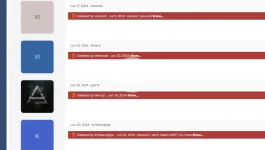
1.webp


~AFTER:
1726818811024.webp
Author
hargrave
Views
235
Extension type
zip
File size
10.2 KB
First release
Last update
Ratings 0.00 star(s) 0 ratings
Link was Broken? Send message to the Website Team and we will assist you quickly!
Support Developer If you are satisfied with the test or your project has earned you money, Click the More Information button to support the developer by purchasing.

More resources from hargrave

WP Cloud Plugins - Dropbox (Out-of-the-Box) H
Say hello to the most popular WordPress Dropbox plugin!
Execor – Accounting and Management Consulting WordPress Theme H
Welcome to Execor – A Modern Theme for Accounting and Management Consulting
Paypal Instant Checkout H
aypal Instant Checkout allows the current product to be checked out in 1 click.

Similar resources

Allow User to Hide Avatars H
If you have accessibility concerns the large avatars showing up on the thread lists
[AndyB] Hide Signature M
Hides signature in selected posts.
[AndyB] New post email staff by forum A
Sends an email to staff when a new post is created in selected forums.
Back
Top