

- XF Compatibility
- 2.2.x
- Short Description
- Enhance your Notable members page with custom icons using our extra.less template. Customize and modify as needed based on specific routes or filters.
Would you like to have icons on Notable members page like this?
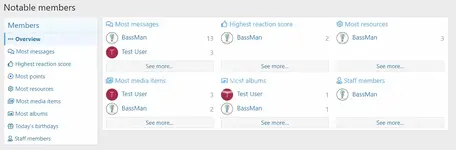
Add this to your extra.less template:
To change the icon edit value after @fa-var-.
If you are using route filters edit in the code what you've changed with filters (for example: if you're using route filter for members to users, then edit above code to suit.
Add this to your extra.less template:
CSS:
/* Icons on Notable members page */
[data-template="member_notable"] .p-body-sideNavContent a.blockLink,
&[data-template="member_notable"] h3.block-textHeader a {
    &:before {
        .m-faBase();
        padding-right: 5px;
    }
    &[href*="members/"]:before {
        .m-faContent(@fa-var-ellipsis-h-alt);
    }
    &[href*="key=most_messages"]:before {
        .m-faContent(@fa-var-comments);
    }
    &[href*="key=highest_reaction_score"]:before {
        .m-faContent(@fa-var-thumbs-up);
    }
    &[href*="key=most_points"]:before {
        .m-faContent(@fa-var-dot-circle);
    }
    &[href*="key=xfrm_most_resources"]:before {
        .m-faContent(@fa-var-cog);
    }
    &[href*="key=xfmg_most_media_items"]:before {
        .m-faContent(@fa-var-images);
    }
    &[href*="key=xfmg_most_albums"]:before {
        .m-faContent(@fa-var-image);
    }
    &[href*="key=todays_birthdays"]:before {
        .m-faContent(@fa-var-gift);
    }
    &[href*="key=staff_members"]:before {
        .m-faContent(@fa-var-user-tie);
    }
}
/*****/
To change the icon edit value after @fa-var-.
If you are using route filters edit in the code what you've changed with filters (for example: if you're using route filter for members to users, then edit above code to suit.


![[cXF] Icons in sidenav on Account page](/data/resource_icons/19/19736.jpg?1720149334)
![[cXF] Coloured Node Icons](/data/resource_icons/19/19740.jpg?1720149334)
![[cXF] Icons in Visitor menu](/data/resource_icons/19/19739.jpg?1720149334)