

- Whmcs Compatibility
- 8.x
- Short Description
- Install WHMCS Payment Gateway Fees module easily by extracting, uploading, activating, configuring access controls, and enabling file loading settings in System Settings. Manage fixed or percentage fees per product for seamless invoice processing. Compatible with WHMCS v8.
write key like:

INSTALLATION Important:
1. Once you have downloaded the <module>.zip file to your computer you need to extract the files using your favourite zip extraction program.
2. Upload modules folder to whmcs folder.
3. Navigate into Setup > Addon Modules and Activate Payment Gateway Fees
4. Now Click on PG Fees Configure Option and Give Access Control as per your need and save the setting.
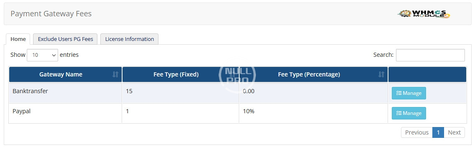
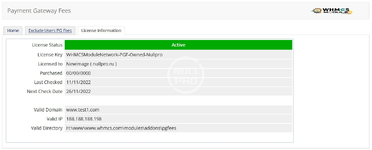
5. Go to Addons > Payment Gateway Fees and configure your Gateway fees and exempted users from pg fees
6. Make sure you have enabled "Attempt to load all files" from "System Settings"->"General Settings"->"Other Tab"->"Encoded File Loading" (This step was require, otherwise the frontend will not display it )
Payment Gateway Fees is a WHMCS add-on which adds additional fees i.e fixed or percentages of the chosen payment gateway by your customer which is automatically calculated. You will be easily able to manage the gateway fees of the respective Payment Gateway module with well-structured way for specific products, add-ons, domains etc.
========================= Features =========================
INSTALLATION Important:
1. Once you have downloaded the <module>.zip file to your computer you need to extract the files using your favourite zip extraction program.
2. Upload modules folder to whmcs folder.
3. Navigate into Setup > Addon Modules and Activate Payment Gateway Fees
4. Now Click on PG Fees Configure Option and Give Access Control as per your need and save the setting.
5. Go to Addons > Payment Gateway Fees and configure your Gateway fees and exempted users from pg fees
6. Make sure you have enabled "Attempt to load all files" from "System Settings"->"General Settings"->"Other Tab"->"Encoded File Loading" (This step was require, otherwise the frontend will not display it )
Payment Gateway Fees is a WHMCS add-on which adds additional fees i.e fixed or percentages of the chosen payment gateway by your customer which is automatically calculated. You will be easily able to manage the gateway fees of the respective Payment Gateway module with well-structured way for specific products, add-ons, domains etc.
========================= Features =========================
- Easy to manage
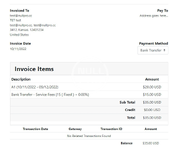
- Adds Percentage/Fixed Fees to the Invoice
- Fees are exlusive of the total invoice amount
- Minimum invoice amount for gateway fees per gateway basis
- Calculation type Standard/ Alternative
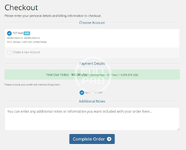
- Fee details in Checkout Page (You can manage it per gateway basis)
- On invoice load tax calculation for unpaid invoices
- If user is exmpted from tax and placed the order then he will not see the fees not will be charged
- WHMCS v8 Ready


