

- Short Description
- Add a wallet function to your WooCommerce store with Wallet for WooCommerce. Transfer funds, set up auto-top-ups, issue gift vouchers, track user actions, and boost sales insights. Convenience for customers, faster checkouts, and better sales visibility.
Wallet for WooCommerce helps your users to quickly complete a purchase by adding funds to the site and using them for future purchases.
Add A Wallet Function To Your Store
Wallet for WooCommerce adds a wallet function to your store.
Wallet payment gateway
A separate payment gateway for using the wallet funds for placing the order.
Fund transfer and request
Your users can transfer/request funds to other users on your site. You have the option of charging your users a fund transfer fee.
Wallet auto top-up
Your users can set up to automatically add funds to their wallets if their wallet balances fall below a specified threshold.
Gift vouchers
The Gift Voucher Module allows you to generate gift vouchers that contain wallet balances. You can issue gift vouchers to your users and they can redeem the gift vouchers to add to their wallet balances.
Wallet balance with expiration dates
You can set up an expiration date for your user’s wallet balance.
Wallet actions
You can award wallet balances to your users for the following actions,
- Account Signup
- Daily Login
- Product Review
You can send email notifications to your users for their Wallet activity.
Offer convenience to your users
Your customers can plan their purchases and add sufficient funds to their accounts to complete them later.
Faster checkout
When your users place their orders through their wallet, they can quickly complete their purchase which reduces cart abandonment.
Insights on future sales
You can get insights on future sales on your site based on the wallet balance of your users.
How does it work?
Wallet funds top-up
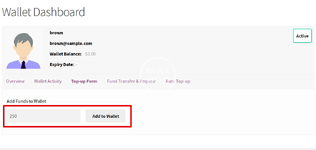
– To add funds to the user’s account, the user will have to access the Top-up form from the Wallet Dashboard.
– Within the section, your users can enter the amount they wish to add to their account and proceed to Top-up.


