
![[WMTech] Time Spent Online](/data/resource_icons/1/1500.jpg?1720149245)
- XF Compatibility
- 2.2.x
- Short Description
- Track member online time and display it on profiles, user lists, and search results. Customize permissions and formats for a seamless experience. Enhance engagement with this versatile feature.
Description
Record members' total time spent online, and add it to their member profiles.
Features
- Profile. Show member's total time online on their account profile.
- Permissions.
- Set who can view it.
- Set who can hide it.
- User option. Members can select if they want it shown (same way as for "last active").
- Promotions. Can be used as a promotion criteria.
- Trophies. Can be used to award trophies.
- Search. Can be used as a search criteria.
- Members list. Show a list of notable members based on time spent online rankings.
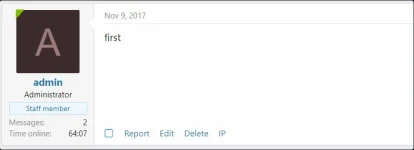
- Message user info item. Can show member's total time online under their avatar in threads.
- Customizable time formats. Show the time spent online in your preferred format.
How it works
Whenever a member browses or performs actions on your forum, their 'last active time' is recorded. When they perform another action or view another page, the time elapsed between the two actions or views is noted. If it is less than the XenForo session timeout period, the elapsed time is added to their total time spent online.
Settings
Time Spent Online ships with sensible default settings. You can customize its behaviour as follows:
- Set the permissions for who has the right to view members' time spent online.
- Admin control panel -> Groups & permissions -> User group permissions
- Set the global options on where member's time spent online is shown.
- Admin control panel -> Setup -> Options
- Add a Message user info element.
- Appearance -> Styles -> Master style - Style Properties -> Settings -> Message user info elements
- Modify the time formats.
- All of the time formats can be modified by modifying the phrases starting with wmt_tso_format_.
- You can insert duration components as follows:
- {yr} years
- {mo} months
- {da} days
- {hr} hours
- {mi} minutes
- {se} seconds
- You can also wrap groups with square brackets. Any group which is zero will not be shown. E.g. [{yr} years] will not appear if the year count is zero.


![[AndyB] Staff Online](/data/resource_icons/0/906.jpg?1720149240)
![[NY] Thread List Online/Oflline Indicator](/data/resource_icons/19/19089.jpg?1720149334)
![[OzzModz] Avatar Online](/data/resource_icons/19/19550.jpg?1720149334)