WPruby WooCommerce Custom Payment Gateway Pro

WPruby WooCommerce Custom Payment Gateway Pro 3.1.1 Nulled

No permission to download
Short Description
Design your own payment gateway and build custom forms. Add a unique icon, customize fields like name, size, and more. Unlimited gateways with full control over order status and API integration for seamless payments. Customize form builder, set API request types, and add payment info to emails. Debug mode included for testing.
WooCommerce Custom Payment Gateway Pro.jpg

design your own payment gateway, and build your own custom payment form. Add your custom payment gateway icon. Submit the payment form to any 3rd party API.
All fields are highly customizable as you can change the name, label, size, default value, CSS class/es, and more.

Unlimited Custom Gateways
Not only you can use the already created gateway, you can create an unlimited number of custom payment gateways and have full control of them.

Custom Gateway Icon
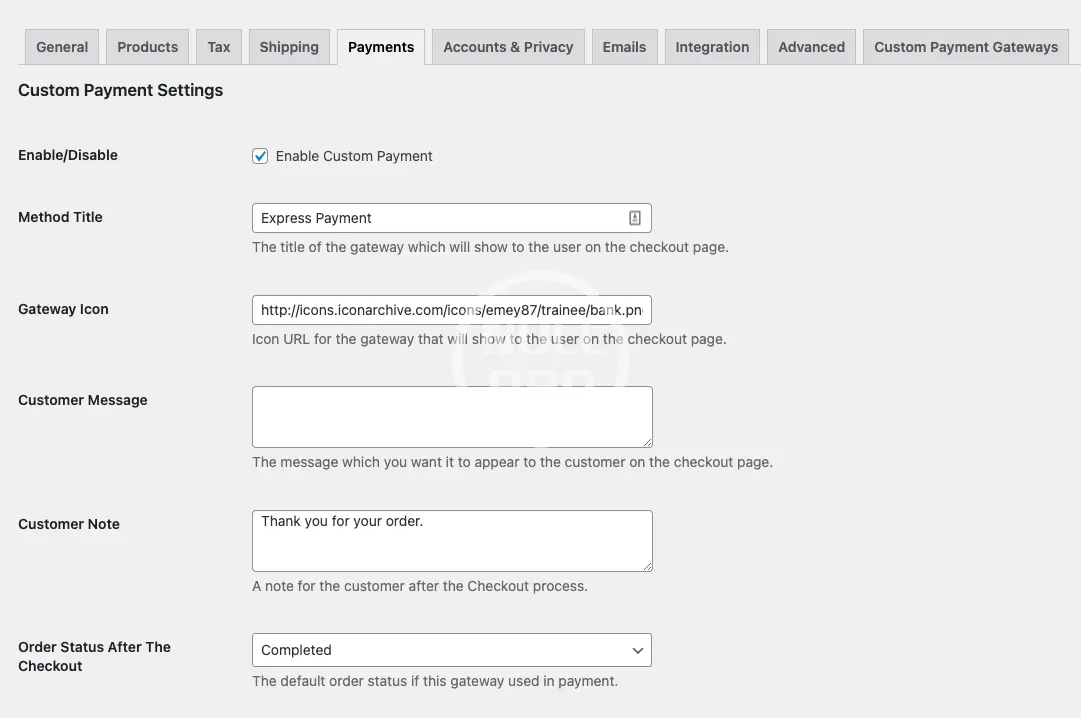
You can differentiate your gateway with a special icon which will be displayed on the Checkout page.

Order Status After Checkout
You can configure the status of the orders that were paid using your custom payment gateway.

Full Form Builder
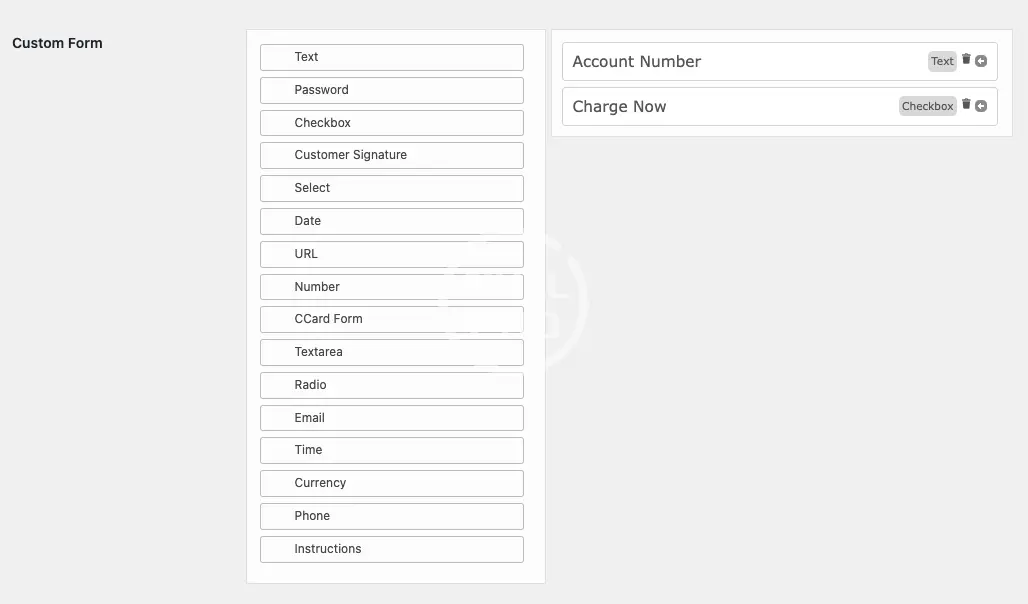
A rich, dynamic and a drag-n-drop form builder to help you as much as possible to customize your gateway form. The form builder supports the following fields:

  • Text
  • TextBox
  • Checkbox
  • Radio Buttons
  • Select Menu
  • Email
  • Date
  • Customer Signature
  • Time
  • URL
  • Currency
  • Number
  • Phone number
  • Credit Card Form
  • Instructions
  • Password
API Request After Checkout
A very powerful tool for allowing the payment information to be sent to an external API in order to process or store the payment information.

  • You can redirect the customer to a custom URL after the checkout.
  • Set the type of the API request, either POST or GET.
  • Set the type of the data of the request, either FORM DATA or JSON.
  • Setting any Extra API parameters such as API keys .. etc
  • Setting API parameters and Key/Value combination of WooCommerce data such as:
    • Order ID
    • Order Total
    • Customer First Name
    • Customer Last Name
    • Customer ID
    • Customer Postcode
    • Customer City
    • Customer State
    • Customer Country
    • Customer Email
    • Customer Phone
    • Customer IP Address
Adding Payment Information To The Order’s Email
An option is available to add the submitted payment information in the Order’s emails.

Debugging Mode
The debug mode is an excellent tool to test out the plugin’s settings and the checkout page as the payment gateway will be only activated for you if the Debug Mode is enabled.

Nulled Method:
Content of this hidden block can only be seen by members of: Bronze Member
  • Screenshot-2022-04-28-at-12.50.47.webp
    Screenshot-2022-04-28-at-12.50.47.webp
    24.6 KB · Views: 0
  • Screenshot-2022-04-28-at-12.50.58.webp
    Screenshot-2022-04-28-at-12.50.58.webp
    8.6 KB · Views: 0
Author
Zechariah
Views
576
Extension type
zip
File size
76.4 KB
First release
Last update
Ratings 0.00 star(s) 0 ratings
Link was Broken? Send message to the Website Team and we will assist you quickly!
Support Developer If you are satisfied with the test or your project has earned you money, Click the More Information button to support the developer by purchasing.

Latest updates

  1. 3.1.1 Nulled - changelog
    * Fixed: Additional PHP Fatal error when HPOS is not enabled.
  2. 3.1.0 Nulled - change log
    * Added: WooCommerce Checkout Blocks support for generated gateways. * Fixed: PHP Fatal error when HPOS is not enabled.
  3. 3.0.0 Nulled - changelog
    * Added: WooCommerce Checkout Blocks support. * Fixed: PHP deprecations warnings.

More resources from Zechariah

Driving Exam Android App Z
Application is the ready made complete Driving Exam application.
Houzi real estate app Z
a full featured Flutter application to connect to your existing Houzez Wordpress Website.
AI Chat & Search Pro Z
Add an AI assistant to your website that helps visitors find what they need in any language.

Similar resources

Binance Pay Payment Gateway for WooCommerce Z
you can enter your Binance Pay merchant information from the payment gateway settings
BWD Product Custom Size Guide For WooCommerce / WooCommerce Product Custom Size Guide N
the ultimate solution for e-commerce businesses seeking to enhance their customers’ shopping experie
Checkout Custom Fields Builder PRO for WooCommerce By StylemixThemes H
Customize the WooCommerce checkout: add, remove, or edit fields to create a simple
Back
Top